On this page
Published: 19 August 2025. Modified: 25 October 2026.
The Problem With Today's AI
An AI assistant only helps with business questions if it can reach the right information. That information is often spread across ERP, CRM, spreadsheets, documents and email. Even when an assistant supports external tools, someone still has to connect those systems, define permissions and keep the data usable.
Enter MCP Servers
Anthropic introduced the Model Context Protocol (MCP) in November 2024. It provides a shared interface between AI applications and external tools and data. Think of MCP as a USB-C-style connection for AI tools: a common interface, not a guarantee that every system works with every assistant.
An MCP server can expose a capability such as searchOrders, describe its inputs and return order information. The server still needs a way to reach the underlying system, whether through an API, database or export. MCP standardizes the assistant-facing interface; it does not replace that integration work.
Types of AI
- Embedded AI: ML in sensors, vision, etc. (outside today's focus)
- Chatbots: Generic assistants that answer based on inputs
- Integrated AI: AI built into apps to assist with tasks
- Agents: Autonomous workflows. Promising, but not universally reliable yet
MCP is not another assistant or a model. It is a protocol that an AI application can use to connect to external capabilities.
How MCP Works
In the MCP tools specification, a client discovers tools with tools/list and invokes them with tools/call. Each tool has a name, a description and an inputSchema describing its arguments. The model can suggest which tool to use next; the application handles the call and the server enforces access to the underlying system.
Example Toolset for ERP Orders
This simplified example shows the tools array from a tool-list result, not a complete protocol response:
{
  "tools": [
    {
      "name": "searchOrders",
      "description": "Search orders by ID",
      "inputSchema": {
        "type": "object",
        "properties": {
          "id": {"type": "string"}
        },
        "required": ["id"]
      }
    },
    {
      "name": "getOrderDetails",
      "description": "Retrieve details for a given order ID",
      "inputSchema": {
        "type": "object",
        "properties": {"orderId": {"type": "string"}},
        "required": ["orderId"]
      }
    }
  ]
}
With the corresponding server implementation, a compatible client can discover these tools and pass their results back to the model. If the server also exposes component and batch lookups, the model may chain calls such as searchOrders → getOrderDetails → getSubTreeOfOrder → getBatchDetails. That is a possible sequence, not a guaranteed workflow. Tool selection, returned data and permissions still need testing.
Case Study: German Clothing Manufacturer
At SFLOW, we applied MCP to a company struggling with data silos:
- Legacy ERP system (no API, only exports)
- Central Excel file
- Shared drive documents
- Shared mailbox
Business Questions
"What are the delivery times of the sub-components of order XXXX?"
"What did my supplier say about their next delivery?"
"Are there shipping delays in the next 6 weeks?"
These questions span several sources and can require manual lookups.
Implementation
- Automated script exported ERP data to Excel
- MCP server wrapped this export and exposed tools
- AI client (Claude with MCP support)
The approach was to expose lookups through a single chat interface rather than move everything into one application. The walkthrough below illustrates that approach with dummy data. It is not a measurement of the manufacturer's time savings or business results.
Demo
For this demo we used the MCP server we set up for the German company and fed it dummy data to see it in action. In the first phase we used an hourly incremental ERP backup as the data source. The manufacturer remains anonymous.
The screenshots show the original Claude Desktop demo from this article's 2025 publication. They are not screenshots of current vendor interfaces or evidence of current product support.
Asking about the business
Imagine waking up and wanting to know how the business is doing. Just ask your AI companion.
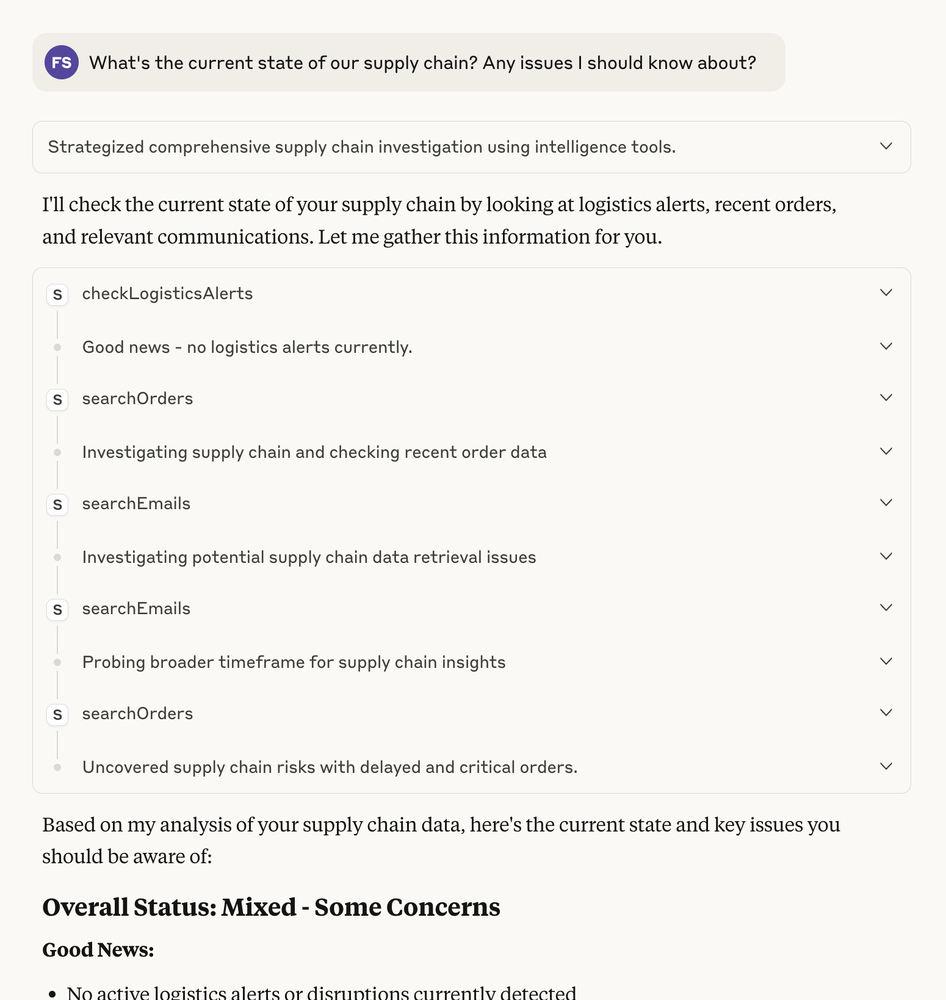
You can really "see" the steps the AI is taking. We gave a vague prompt, and it finds its way through the data. The arrows on the right also let you check what was sent and received.
You can use the built-in text-generation capabilities of a model to generate a nice overview of the things you want to see.
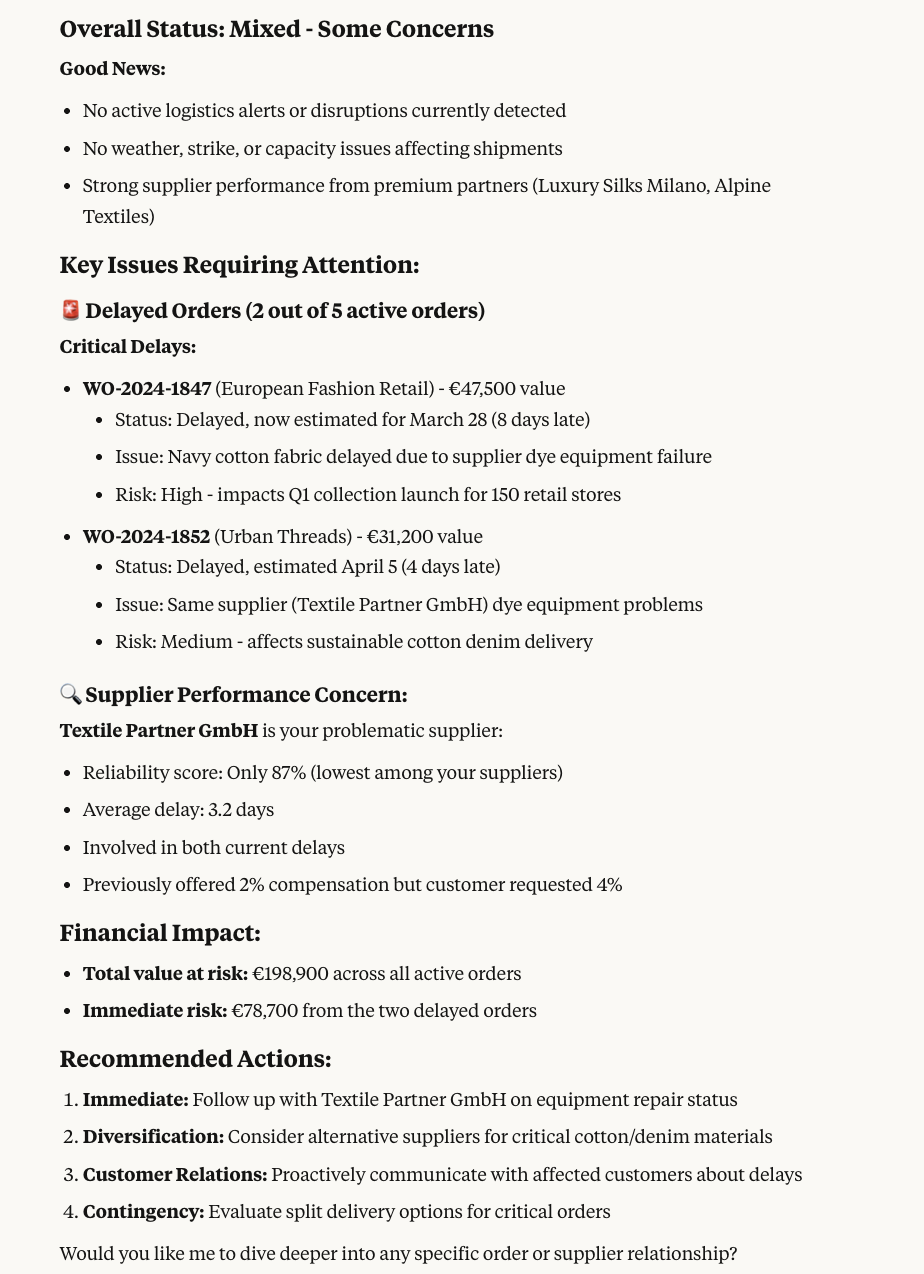
In this case the AI provides a very verbose outcome, but it's perfectly possible to ask it to be more to-the-point, friendlier, etc.
Diving deeper
You can ask follow-up questions about the results and explore a specific order.
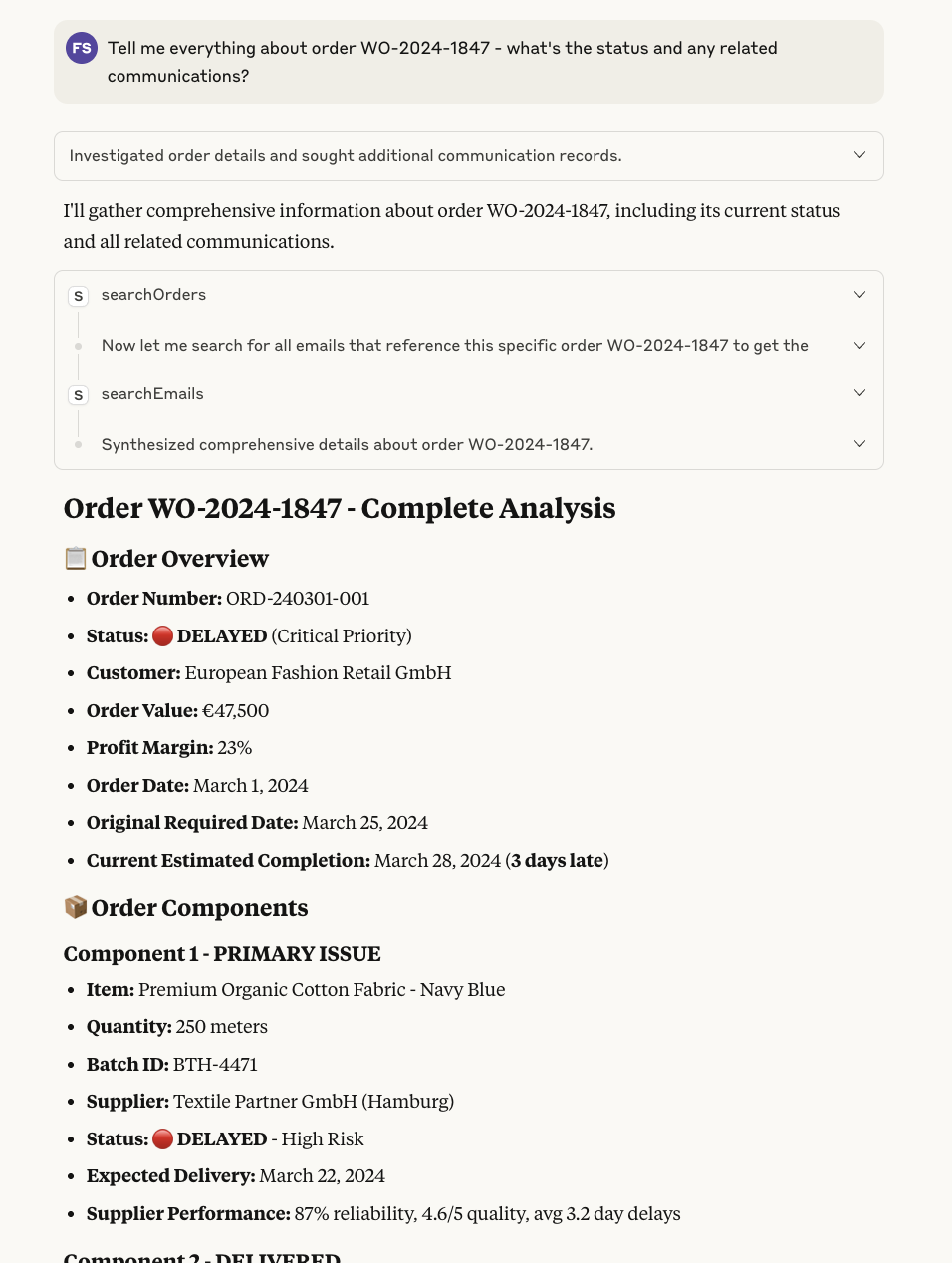
Here is where MCP really shines: you can directly "dive deeper" into a topic without needing to switch context. Ask questions, explore data...
The model will even propose actions that you could take as a next step based on the information it receives.

The core capability here is that you, as a person, are always in the driver's seat. You control, check and guide the AI on where to go.
Combining multiple tools
In this demo, Claude also searches for alternatives to a problematic supplier. This is not always what you want, but it shows how an assistant can combine internal lookups with external tools. Those extra tools need their own permissions and review.
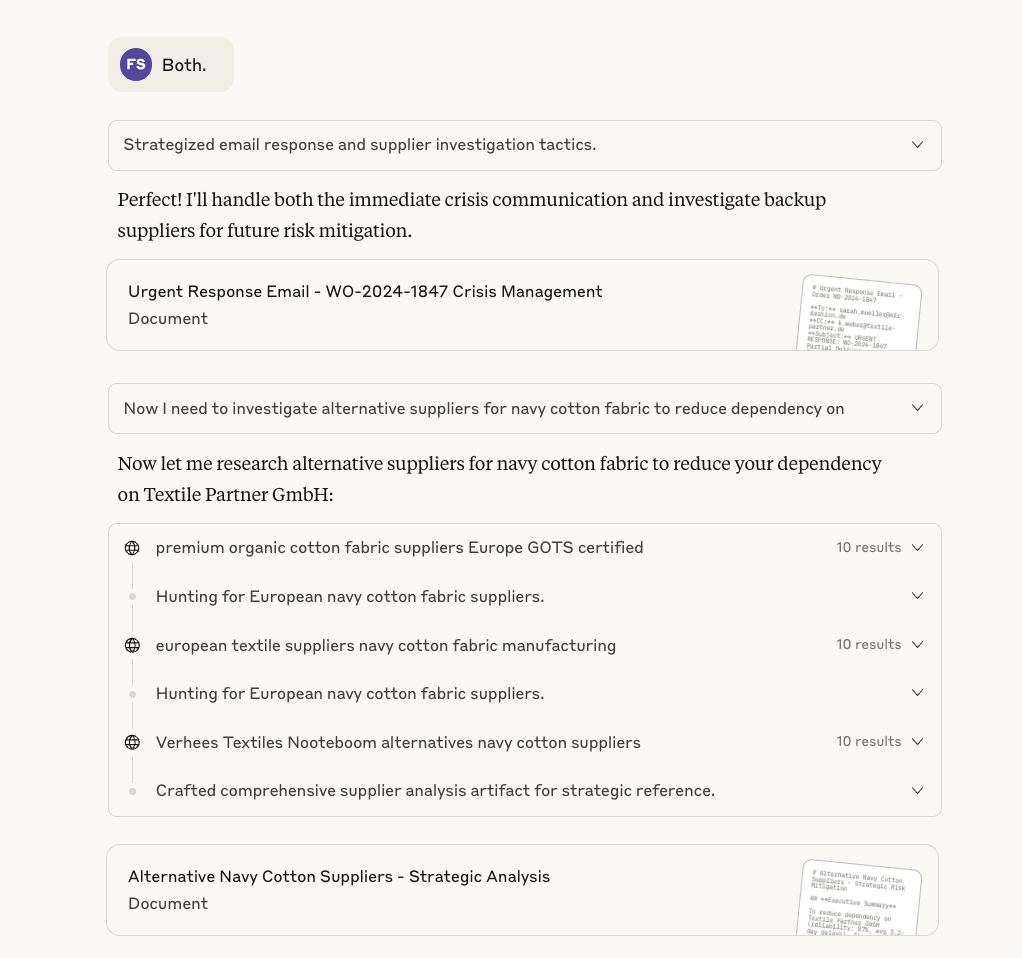
In this case the AI went a bit further and tried to find alternatives. In a more realistic scenario you could ask how a real world event could impact your supply chain.
Taking action
Let's ask our AI to send a message to the client about the delay and apologize.
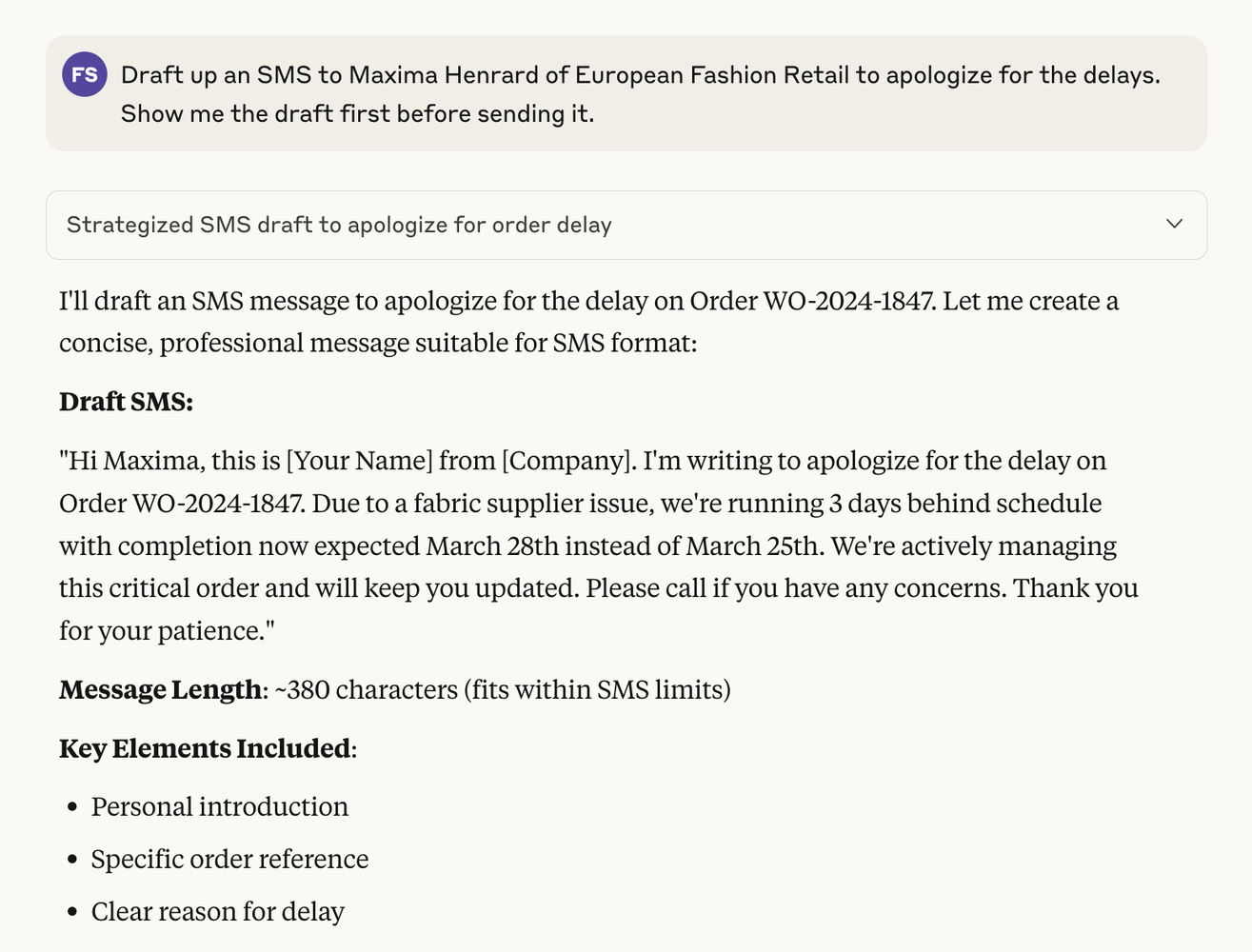
This is a very simple example, but it really shows the connectedness of everything. Instead of looking through the ERP, emails, contacts, etc., we just have one single interface from where we are in the cockpit.
The demo skips some steps between drafting and sending. A connected SMS tool can send a message, but a business implementation should require confirmation of the recipient and final text before sending.
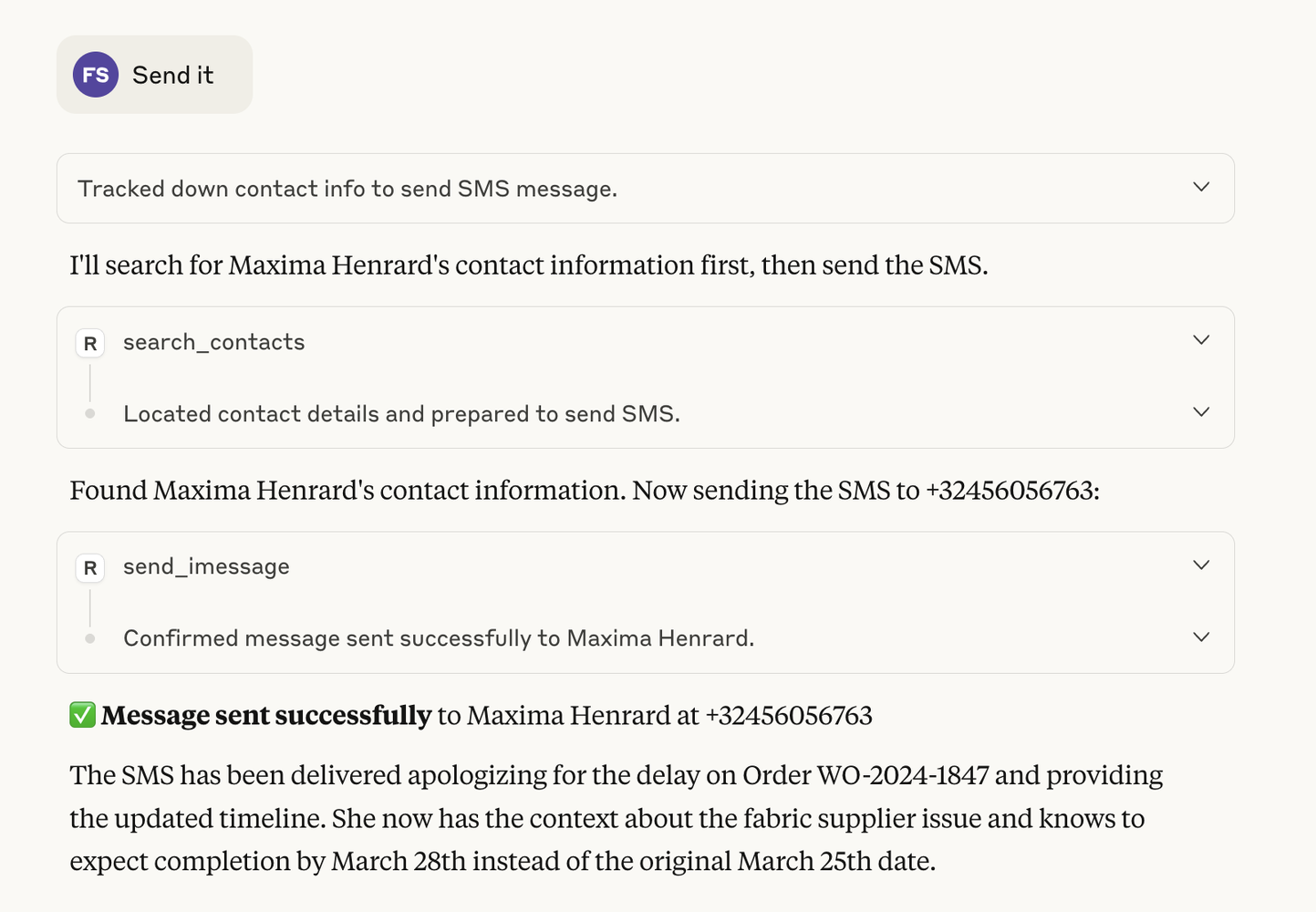
And it gets sent as if you sent it yourself.
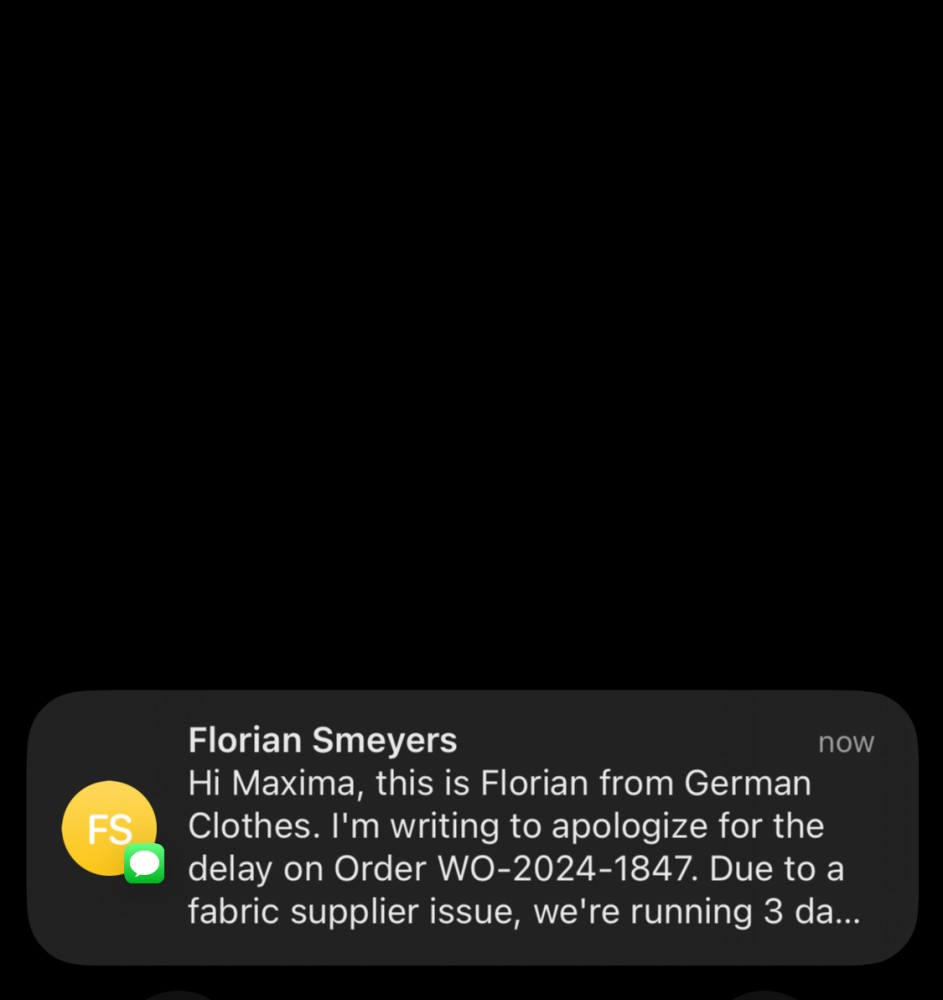
Your AI really becomes as powerful as the tools you give it. But MCP radically simplifies the way you can start small, test, iterate and grow from there.
Demo qualification: the screenshots use dummy, anonymized and scrambled information. The displayed messages and recommendations illustrate tool use, not verified client outcomes.
Why MCP Is Different From Just an API
- Shared interface: Compatible clients can reuse a server's tool definitions rather than each needing a different assistant-facing adapter.
- Discoverable tools: Names, descriptions and input schemas tell the client what it can call.
- Combinable calls: A model can use one result to propose the next lookup, subject to application controls.
- Not a replacement for APIs: The server still needs integration code, credentials and maintenance for the systems behind it.
Should We Care?
There are now concrete options beyond the original desktop demo. As checked on 25 October 2026:
- Anthropic documents a beta MCP connector for the Claude Messages API, supporting tool calls to remote HTTP servers.
- OpenAI documents remote MCP server support in the Responses API, with configurable tool approvals.
- Google documents remote MCP support in the Gemini Interactions API, limited to Streamable HTTP servers.
- GitHub maintains its official MCP server, with GitHub-hosted remote and local options for compatible clients.
Those are specific supported interfaces, not proof that every assistant, plan or business application supports the same features. Check the client, transport and authentication requirements before choosing a server. For a business, a useful starting point is one repeated question that currently requires several lookups.
What About Security?
Security is not optional. The MCP tools specification calls for server-side input validation and access controls, and recommends confirmation for sensitive operations and tool-use logging. These controls must be implemented; the protocol does not give a server a trustworthy audit trail automatically.
OpenAI's safety guidance also warns about malicious servers and prompt injection. Start with trusted, narrowly scoped, read-only tools. Review what data leaves the business, and require explicit approval before tools send messages or change records. A model's recommendation is not authorization.
The Takeaway
MCP offers a shared interface for exposing business capabilities to compatible AI applications. The vendor documentation above shows practical connection options, but not universal compatibility or guaranteed savings.
- Pick a useful lookup and identify its source data.
- Expose only the tools and records the user is allowed to access.
- Test the answers, tool sequence and failure cases with the client you intend to use.
- Add write actions only when approval and logging are in place.
The model can help choose a path through the available tools. Your integration still owns data quality, permissions and the rules for what may happen next.
For the service behind this integration work, see our approach to fixing and extending business software.
More to Read
Want to discuss a project like this?
SFLOW helps companies implement practical AI solutions — from custom platforms to industrial integrations with your existing systems.