
Module 5: Plan Mode & the PDCA Cycle
Plan Mode is Claude Code's read-only reconnaissance mode. Claude can read files, search code, explore the codebase, and reason about architecture, but it cannot write files or run destructive commands. It's "look before you leap" built into the tool.
This matters because the most expensive mistakes happen when you start implementing before you understand the problem. Plan Mode forces the exploration phase, and when combined with a structured workflow, it consistently produces better outcomes than diving straight into code.
Entering Plan Mode
Toggle with Shift+Tab, use the /plan command, or start Claude Code with claude --permission-mode plan. See the official docs for the full details on plan mode mechanics.
The key insight: when Claude can't modify anything, it focuses entirely on understanding. No premature refactoring, no scope creep, no "while I'm here let me also..." Just analysis.
The Four-Phase Workflow
Plan Mode is most effective as part of a structured workflow: Explore, Plan, Implement, Commit.
Phase 1: Explore (Plan Mode)
Start in plan mode. Ask Claude to understand the relevant parts of the codebase before anything else.
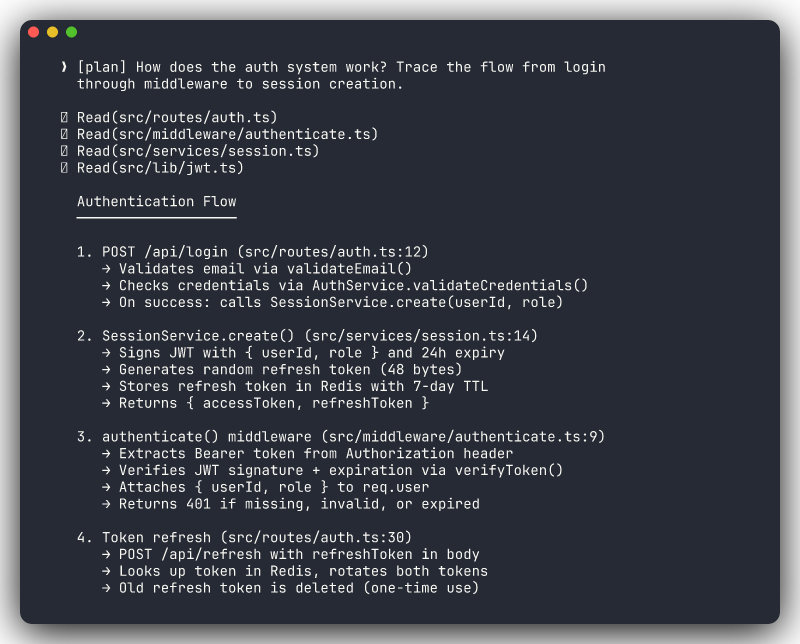
How does the authentication system work in this project? Trace the
flow from login request through middleware to session creation.
What's the current architecture for handling payments? Show me the
key files and how they interact.Where are all the places we validate user input? Are they consistent?Claude reads files, traces call paths, examines patterns. You build a shared understanding of the current state before proposing changes.
Phase 2: Plan (Plan Mode)
Still in plan mode. Now that you and Claude understand the current state, define what needs to change.
I want to add password reset functionality. Create a plan covering:
- Files to modify and files to create
- The user-facing flow (request reset, receive email, set new password)
- How it integrates with the existing auth system
- What tests to write
Claude produces a concrete plan: specific files, specific changes, specific test cases. You review the plan before a single line of code is written.
Review the Plan Critically
This is your cheapest feedback loop. Catching a design mistake in the plan costs you a few minutes of reading. Catching it after implementation costs you a rejected diff and rework. Push back on the plan if something doesn't feel right.
Phase 3: Implement (Normal Mode)
Exit plan mode (Shift+Tab) and tell Claude to execute the approved plan.
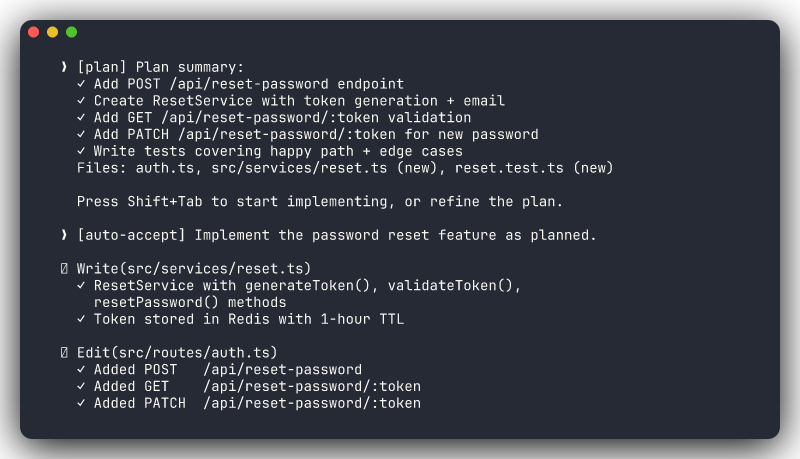
Implement the password reset feature as planned. ONLY modify the files
we discussed. Work through it step by step — I'll review each change.
By referencing "as planned," you anchor Claude to the plan you already approved. The "ONLY" constraint prevents scope creep. "Step by step" keeps diffs reviewable.
Review each proposed change. Accept or reject individually. If something deviates from the plan, say so.
Phase 4: Commit (Normal Mode)
After implementation, verify and commit:
# Review everything that changed
git diff

# Run the test suite
npm test    # or pytest, dotnet test, etc.

# If everything passes, commit
git add -A && git commit -m "Add password reset functionality"
If tests fail, stay in normal mode and let Claude fix them. If the implementation needs adjustment, iterate before committing.
Quality Check Before Committing
Consider running /simplify to review your changes for code quality before committing. For comprehensive PR review, use /pr-review-toolkit:review-pr (from the pr-review-toolkit plugin). See Module 7 for the full extensibility stack including skills and plugins.
The PDCA Cycle
The four-phase workflow maps directly to the Plan-Do-Check-Act cycle, a proven quality framework that works well with agentic AI development.
Plan
Enter plan mode. Explore the codebase. Design the approach. The output is a written plan with:
- Files to change (and files NOT to change)
- Implementation approach
- Test strategy
- Potential risks or edge cases
This is your investment in understanding before acting.
Do
Exit plan mode. Implement with approval at each step. One change at a time. Review each diff before accepting.
Keep Claude constrained to the plan. If it wants to go beyond scope, redirect: "Let's stick to the plan. We can address that separately."
Check
Verify the work against objective criteria:
# Review all changes
git diff

# Run the test suite
npm test        # JavaScript
pytest           # Python
dotnet test      # .NET
go test ./...    # Go

# Manual verification where appropriate
npm run dev      # Start the app and check the feature
Don't skip the check phase. "It compiled" is not verification. "The tests pass and I manually confirmed the behavior" is verification.
Act
Based on what you found in the check phase:
- Accept: Changes are correct and verified. Commit them.
- Iterate: Something's not right. Feed the specific issue back to Claude and repeat Do-Check.
- Reject: The approach is fundamentally wrong. Go back to Plan with what you learned.
Each cycle is self-correcting. The check phase catches what the plan missed. The act phase feeds learnings back into the next cycle.
PDCA in Practice
This structured approach resonates with experienced developers because it gives clear checkpoints and explicit control. Claude handles the heavy lifting at each phase, but you own every decision point.
When to Use Plan Mode
Plan Mode adds a step to your workflow. It's valuable when that step prevents expensive rework, and unnecessary when the task is simple.
Use Plan Mode
- Unfamiliar codebase: you (or Claude) need to understand before acting
- Multi-file changes: changes that ripple across several files or layers
- Architectural decisions: choosing between approaches with different tradeoffs
- High-risk changes: database migrations, auth changes, payment logic
- When you want a second opinion: "before I implement this, what am I missing?"
- Onboarding to a new project: explore the codebase systematically before making any changes
Skip Plan Mode
- Simple single-file changes: a bug fix in one function, a style update
- Well-understood tasks: you've done this exact thing before and know what to change
- Trivial operations: rename a variable, update a string, fix a typo
- You already have a plan: you designed the approach yourself and just need Claude to execute
The rule of thumb: if you can describe the change in one sentence AND you know which files are involved, you probably don't need plan mode. If either of those is unclear, plan first.
Common Plan Mode Mistakes
Staying in plan mode too long. Plan mode is for planning, not for perfecting the plan. Once you have a reasonable approach, switch to implementation. You'll learn more from writing code than from refining a plan.
Skipping plan mode for complex changes. The impulse to "just start coding" is strong, especially when you think you understand the task. But multi-file refactors, architectural changes, and unfamiliar codebases consistently benefit from a planning phase.
Not referencing the plan during implementation. After switching to normal mode, explicitly tell Claude to follow the plan: "Implement the approach we discussed." Without this reference, Claude may generate a fresh solution that diverges from what you approved.
Planning without constraints. A plan mode prompt without scope boundaries produces an over-engineered plan. "Add caching to the reports endpoint" gets you a comprehensive caching architecture. "Add Redis caching to the reports endpoint. Cache the query result for 5 minutes, invalidate on write" gets you a practical plan.
Key Takeaways
- Plan Mode is read-only reconnaissance: Claude explores and analyzes but cannot modify files or run destructive commands.
- The four-phase workflow (Explore, Plan, Implement, Commit) prevents expensive rework by front-loading understanding.
- The PDCA cycle (Plan-Do-Check-Act) gives you explicit control at every decision point, with Claude handling the execution.
- Use plan mode for unfamiliar code, multi-file changes, architectural decisions, and high-risk modifications.
- Skip plan mode for simple, well-understood, single-file changes.
- Always reference the approved plan when switching to implementation: "Implement as planned. ONLY modify the files we discussed."
- The check phase is non-negotiable. Run tests, review diffs, verify behavior before committing.