
Module 9: Automation & Multi-Surface Workflows
Claude Code is a scriptable agent that runs in CI pipelines, cron jobs, and across multiple surfaces from terminal to mobile. Everything you've done interactively can be automated, scheduled, and monitored remotely.
This module covers practical automation patterns and the multi-surface workflow that makes Claude Code effective beyond the interactive terminal.
Headless Mode
The -p flag runs Claude Code non-interactively. It takes a prompt, executes it, and writes the result to stdout. No conversation, no follow-up questions — just input and output.
claude -p "Explain what this project does"This is the foundation for every automation pattern in this module. If it goes to stdout, you can pipe it, redirect it, or capture it in a script.
Practical Examples
Generate a changelog from recent commits:
claude -p "Summarize the changes in the last 5 commits as a changelog" > changelog.txtPipe a diff for review:
git diff | claude -p "Review these changes for bugs and security issues"Staged change review before committing:
git diff --staged | claude -p "Review these staged changes. Flag anything that looks wrong."Output Formats
| Format | Flag | Use case |
|---|---|---|
| Text | (default) | Human-readable output, scripts that parse text |
| JSON | --output-format json | Structured data for downstream tools, APIs |
| Stream JSON | --output-format stream-json | Real-time processing of long-running tasks |
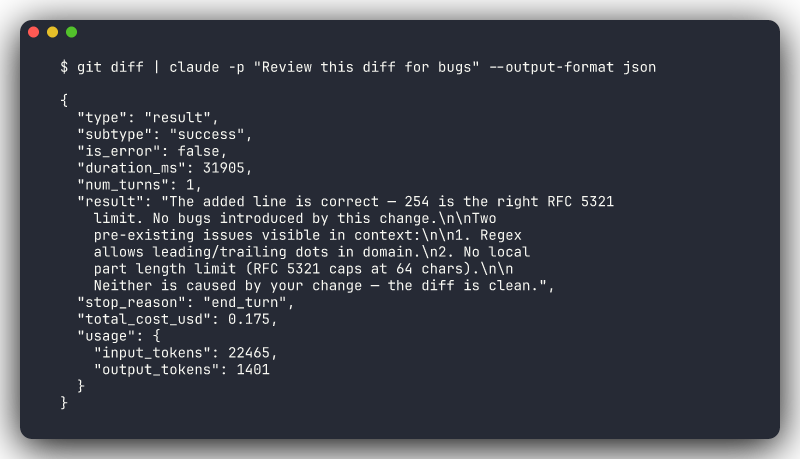
Headless Mode Still Reads CLAUDE.md
Headless mode reads your project's CLAUDE.md file. All your project conventions, constraints, and skills apply automatically, even in CI. You don't need to repeat project-specific instructions in every -p prompt.
CI/CD Integration
Headless mode makes Claude Code a natural fit for CI pipelines. The pattern: install Claude Code, pass it a prompt with relevant context, use the output.
For CI/CD setup instructions and YAML templates (GitHub Actions, GitLab CI, Azure DevOps), see the official CI/CD documentation.
Creative CI Use Cases
Code review is the obvious CI integration, but there's much more:
| Use case | Prompt pattern |
|---|---|
| Changelog generation | git log --oneline v1.2..HEAD | claude -p "Write release notes from these commits" |
| Test gap analysis | claude -p "Identify functions in src/ that have no corresponding test coverage" |
| Documentation sync | claude -p "Check if the API docs in docs/ match the actual endpoint signatures in src/routes/" |
| Migration validation | claude -p "Verify all database migration files are reversible and follow our naming convention" |
| Dependency audit | claude -p "Review package.json for outdated or vulnerable dependencies and suggest updates" |
These turn Claude Code from "code review bot" into a flexible CI agent that can check anything you can express as a prompt.
API Key Security
Never hardcode your API key in pipeline definitions. Use your CI platform's secret management: GitHub Secrets, GitLab CI Variables, or Azure DevOps Variable Groups. The key should only exist as an environment variable at runtime.
/loop — Recurring Tasks
Some tasks aren't one-shot. /loop runs a prompt or command on a recurring interval within your current session.
/loop 5m Check if the deployment to staging has completed. Look at the
output of 'kubectl get pods -n staging' and tell me when all pods are
Running.
The first argument is the interval (defaults to 10 minutes if omitted). The rest is the prompt that runs each cycle.
Use Cases
Monitor a deployment:
/loop 2m Run 'kubectl rollout status deployment/api -n production' and
summarize the current state. Alert me when it's complete or if there
are errors.
Watch a long-running test suite:
/loop 5m Check if the integration test suite is still running. Look at
the latest output in test-results/ and report any new failures.
Periodic health check during development:
/loop 10m Run the smoke tests and tell me if anything has broken since
last check.
Session Requirement
/loop runs inside your current Claude Code session. The session must stay open for the loop to continue. For tasks that should run on a schedule regardless of whether you have a session open, use system cron with claude -p.
Remote Control
Claude Code sessions running in your terminal can be accessed from other devices. Start a long-running task on your workstation and monitor it from your phone or laptop while away from your desk.
Use Cases
Monitor from mobile: You kicked off a large refactor before lunch. Check progress from your phone to see if Claude hit any issues that need your input.
Approve from anywhere: Claude needs permission to run a destructive command or push to a branch. Approve it from your phone instead of walking back to your desk.
Review results on the go: A long task completed. Review the results and decide next steps from your tablet.
Connection Persistence
The session runs on the machine where you started it. Remote control gives you a window into that session. If the original machine goes to sleep or loses network, the session pauses.
Multi-Surface Workflows
Claude Code runs across multiple surfaces — terminal, VS Code, JetBrains IDEs, Chrome extension, desktop app, and mobile (via remote control). Each has different strengths.
The General Rule
Use the terminal for doing, use an IDE for reviewing, use mobile for monitoring.
A typical workflow across surfaces:
- Terminal or IDE: Give Claude a task, watch it work
- VS Code / JetBrains: Review the diffs visually, check the changes make sense
- Terminal: Run tests, commit, push
- Mobile: Monitor CI pipeline, approve deployment
Don't Overthink It
Most developers use the terminal or their IDE's integrated terminal for 90% of their work with Claude Code. The other surfaces are valuable for specific situations — don't feel like you need to use all of them. Start with what's comfortable and add surfaces when you hit a use case that calls for one.