
Module 8: Agents & Parallel Development
Claude Code doesn't just work alone. It can delegate, parallelize, and orchestrate. A single Claude Code session can spawn independent agents, apply changes across dozens of files simultaneously, and coordinate teams of agents working in parallel across your codebase.
This module covers the practical strategies: when to use each approach, how to get the best results, and how to build custom agent workflows.
Subagents
When Claude Code encounters a task that benefits from investigation or exploration, it can spawn subagents — independent Claude instances that run in parallel, each with their own context window.
For the full technical details on how subagents work, their tool access, and permission model, see the official subagents documentation.
Why Subagents Matter
Two practical reasons to care about subagents:
- Context stays clean. Your main session's context window doesn't fill up with exploration artifacts. If a subagent reads 40 files to understand a module, the main session gets a paragraph summary, not 40 files of content.
- Work parallelizes. Multiple subagents can investigate different parts of the codebase simultaneously.
How to Encourage Parallel Work
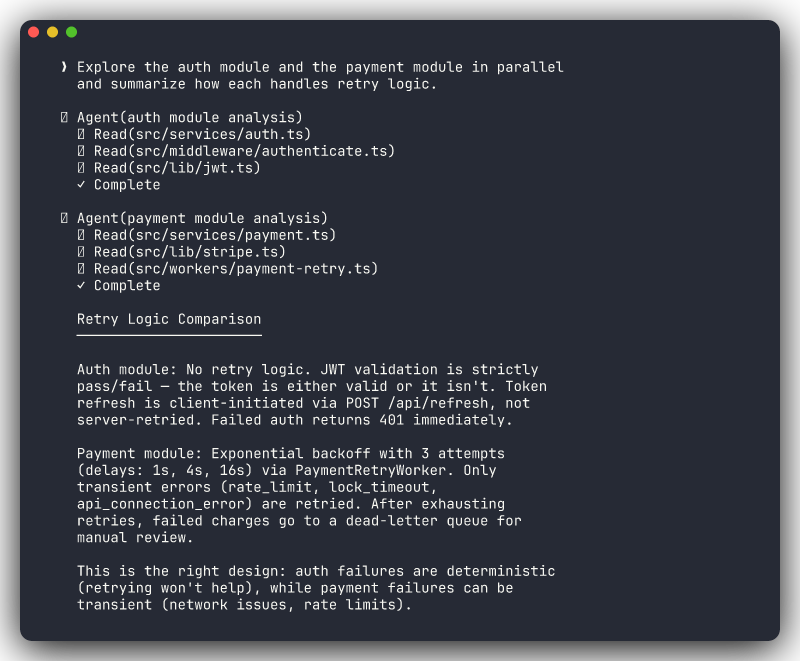
You can nudge Claude toward subagent use by making the parallelism explicit in your prompt:
Explore the auth module and the payment module in parallel and
summarize how each handles retry logic.
Investigate the frontend routing and the API middleware independently,
then tell me where they disagree on route names.The word "parallel" or "independently" signals that these are separable tasks. Claude takes the hint.
When Subagents Help Most
| Scenario | Why subagents help |
|---|---|
| Understanding a large codebase | Multiple areas explored simultaneously |
| Research before implementation | Investigation doesn't pollute the context you'll use for coding |
| Comparing patterns across modules | Each module analyzed in isolation, then compared |
| Audit tasks (security, style, etc.) | Different audit concerns checked in parallel |
Subagents vs. Doing It Yourself
You can always just ask Claude to "look at auth, then look at payments." It will do it sequentially in the main context. Subagents are better when the exploration is large enough that carrying all of it in context would crowd out the actual implementation work that follows.
Custom Subagents
You can create custom subagents as .md files in .claude/agents/. Each file defines a specialized agent with its own instructions, tool restrictions, and model preferences.
Configuration with YAML Frontmatter
---
name: security-reviewer
description: Reviews code for security vulnerabilities
model: sonnet
tools:
  - Read
  - Grep
  - Glob
---

Review the specified code for security vulnerabilities:

1. Check for injection risks (SQL, XSS, command injection)
2. Verify authentication and authorization checks
3. Look for sensitive data exposure
4. Check for insecure dependencies

Report findings with file paths, line numbers, and severity levels.
Only report issues you are confident about.
Save this as .claude/agents/security-reviewer.md and Claude can use it as a specialized subagent when security review is needed.
What You Can Configure
tools: Restrict which tools the subagent can use (e.g., read-only agents that can't edit files)model: Use a faster/cheaper model for simple tasks, a more capable model for complex onesdescription: Helps Claude decide when to use this agent automatically
Custom subagents are particularly powerful for encoding team expertise: a "database reviewer" that knows your migration patterns, an "API validator" that checks your REST conventions, or a "test writer" that follows your testing patterns.
/batch for Large-Scale Changes
Some tasks are the same change, repeated across many files. /batch orchestrates parallel subagents to apply the same type of change across many files simultaneously.
Use Cases
/batch
Update all imports from '@old-lib/utils' to '@new-lib/utils' across
the codebase. Adjust any renamed exports per the migration guide in
MIGRATION.md.
/batch
Add structured error handling to every Express route handler in
src/routes/. Follow the pattern in src/routes/users.ts.Always Verify After Batch Operations
Run your test suite after every batch operation. Parallel changes can introduce subtle issues: a renamed function that two subagents both update differently, a shared import that gets modified twice, or cascading type errors from interface changes.
Git Worktrees
Git worktrees let you have multiple working copies of the same repository simultaneously, each checked out to a different branch. Claude Code integrates with them via claude --worktree for isolated experimentation.
Use Cases
Risky refactors:
claude --worktree
> Refactor the database layer to use connection pooling. This will
> touch a lot of files — I want to review before merging.
Parallel feature exploration:
# Terminal 1: you keep working on your feature
claude
> Continue implementing the search endpoint

# Terminal 2: Claude explores an approach in isolation
claude --worktree
> Prototype a WebSocket-based notification system.
Agent Teams
Agent Teams take parallelism from "one agent spawning helpers" to "a coordinated team working across your codebase simultaneously." A Team Lead breaks down the task, assigns work to Specialist Agents (each in their own worktree), and coordinates the results.
When to Use What
| Approach | Best for | Context cost | Parallelism |
|---|---|---|---|
| Single session | One area of code, simple task | Lowest | None |
| Subagents | Research + implementation, exploring multiple areas | Medium | Investigation only |
| Agent Teams | Large features across many areas, parallel implementation | Highest | Full parallel implementation |
Start Simple, Scale Up
Don't reach for Agent Teams when a single focused prompt will do. Most tasks, even multi-file ones, are handled well by a single session. Agent Teams shine when you have genuinely independent workstreams that can proceed in parallel with occasional coordination.
Building Custom Agent Workflows
You don't need an SDK to build agent-like automation with Claude Code. The built-in extensibility stack — skills, headless mode, and shell scripting — covers most custom agent use cases.
Skills as Agent Steps
Skills (.claude/skills/) are your building blocks. Each skill is a reusable prompt template that encodes a specific workflow step:
.claude/skills/analyze-module/SKILL.md   →  /analyze-module src/auth
.claude/skills/generate-tests/SKILL.md   →  /generate-tests src/auth
.claude/skills/review-changes/SKILL.md   →  /review-changes
Chain these manually in a session, or automate them with headless mode.
Headless Mode for Scriptable Agents
claude -p runs Claude Code non-interactively, making it the foundation for agent-like automation:
#!/bin/bash
# A simple "code review agent" that runs on every PR

DIFF=$(git diff main...HEAD)

claude -p "Review this diff for bugs, security issues, and performance
problems. Be specific about file names and line numbers.

$DIFF" --output-format json
Multi-Step Agent Scripts
Combine multiple headless calls into a multi-step workflow:
#!/bin/bash
# Custom "feature audit" agent

# Step 1: Analyze the module
ANALYSIS=$(claude -p "Analyze the architecture of $1 and identify potential issues")

# Step 2: Check test coverage
COVERAGE=$(claude -p "Check test coverage for $1. List functions without tests.")

# Step 3: Generate a report
claude -p "Given this analysis and coverage report, generate an action plan.

Analysis:
$ANALYSIS

Coverage:
$COVERAGE"
Headless Mode is Your Agent Runtime
Most "custom agent" needs are really just shell scripts calling claude -p with different prompts. Before building anything complex, check if a bash script with a few headless invocations solves the problem. Module 9 covers headless mode and CI integration in detail.