
Module 7: The Extensibility Stack
Claude Code has six layers of extensibility. Understanding when to use each one is the difference between a well-oiled workflow and a tangled mess of configuration. Most developers only use one or two. This module maps out all six so you can pick the right tool for the job.
The 6-Layer Stack
| Layer | What | When to Use | Example |
|---|---|---|---|
| CLAUDE.md | Static project context | Every project — the baseline | Coding standards, build commands, architecture |
| .claude/rules/ | Path-specific rules | Large projects with different patterns per area | Component guidelines for src/ui/, API patterns for src/api/ |
| Hooks | Shell commands on events | Enforce formatting, linting, validation automatically | prettier --write after every file edit |
| Skills | Reusable prompt workflows | Repeatable workflows, complex multi-step logic | Project: /deploy-check, Built-in: /simplify, Plugin: /superpowers:brainstorming |
| MCP Servers | External tool integrations | Connect to databases, APIs, services, browsers | Azure DevOps, GitHub, Playwright, Supabase |
| Plugins | Bundled distribution packages | Share skills, hooks, MCP configs across teams | superpowers, pr-review-toolkit |
Each layer builds on the previous ones. Start with CLAUDE.md, add layers as your needs grow. Most projects only need the first three or four.
CLAUDE.md & Rules (Recap)
Covered in depth in Module 2. The essentials:
- Markdown file at your repo root, read automatically every session
- Contains build commands, architecture overview, conventions, gotchas
- Commit it to version control so the whole team benefits
- Keep it accurate and concise. 30 good lines beat 200 stale ones.
- Split concerns with
.claude/rules/*.mdfiles scoped to specific directories
Hooks
Hooks are shell commands that run automatically when Claude Code performs specific actions. They're the enforcement layer: they run regardless of what Claude "remembers" from your CLAUDE.md.
The Key Concept
If you put "always run Prettier after editing files" in CLAUDE.md, Claude will usually do it — but sometimes it forgets, especially in long sessions. A hook does it every time, no exceptions. Use CLAUDE.md for guidance and hooks for enforcement.
Example: Auto-Format After Every File Edit
{
  "hooks": {
    "PostToolUse": [
      {
        "matcher": "Edit|Write",
        "hooks": [
          {
            "type": "command",
            "command": "npx prettier --write $CLAUDE_FILE_PATH"
          }
        ]
      }
    ]
  }
}
This ensures every file Claude touches matches your formatting rules, regardless of what's in context.
What's Available
Claude Code supports 10+ hook events (PreToolUse, PostToolUse, Stop, Notification, SessionStart, SessionEnd, UserPromptSubmit, SubagentStart, SubagentStop, and more) and multiple handler types beyond command (including http, prompt, and agent handlers).
For the full list of events, handler types, environment variables, and stdin JSON format, see the official hooks documentation.
Keep Hooks Fast
Hooks run synchronously. Claude Code waits for them to finish before continuing. A 200ms Prettier run is fine. A 30-second test suite as a PostToolUse hook will make every edit painfully slow. Save heavy validation for Stop hooks or run it manually.
Skills
Skills are reusable prompt workflows invoked as slash commands. They encode your team's workflows as shareable prompt templates.
Where Skills Live
| Location | Scope | Example |
|---|---|---|
.claude/skills/skill-name/SKILL.md | Project (shared via version control) | /deploy-check, /fix-issue |
~/.claude/skills/skill-name/SKILL.md | Personal, all projects | /standup, /my-review |
| Built-in | Bundled with Claude Code | /simplify, /batch, /loop |
| Plugin | Via plugin marketplace | /superpowers:brainstorming, /pr-review-toolkit:review-pr |
Example: Fix Issue
.claude/skills/fix-issue/SKILL.md:
Look up issue #$ARGUMENTS in our issue tracker.

1. Read the issue description and acceptance criteria
2. Find the relevant code in the codebase
3. Implement the fix
4. Write tests that cover the fix
5. Run the test suite and fix any failures
6. Create a commit with the message "fix: <short description> (closes #$ARGUMENTS)"
Usage: /fix-issue 123
Because .claude/skills/ lives in your repo, committing these files means every team member gets the same slash commands. This is one of the highest-value things you can do for team consistency.
MCP Servers
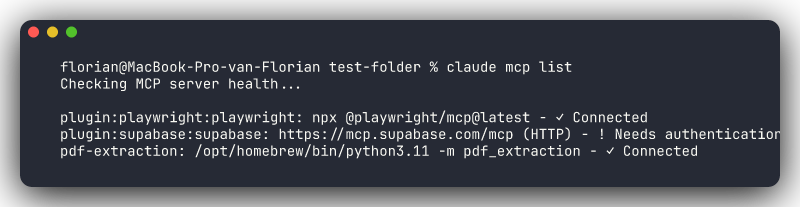
MCP (Model Context Protocol) connects Claude Code to external tools and services — APIs, databases, browsers, and third-party services that go beyond the local filesystem and terminal.
For setup commands, configuration options (.claude/settings.json, .mcp.json), OAuth authentication, managed MCP policies, and the full list of available servers, see the official MCP documentation.
CLI vs MCP: Choosing the Right Approach
MCP isn't always the answer. Many external tools have mature CLIs that Claude Code can use directly via Bash.
Prefer CLI when:
- The tool has a mature CLI you already use (
gh,aws,az,kubectl,docker,psql,terraform,dotnet) - It's a one-off or occasional task
- You want the exact same commands you'd type manually
Prefer MCP when:
- No good CLI exists (Slack, Jira, browser automation)
- You need structured tool discovery, where Claude can list available MCP tools and pick the right one
- You want team-consistent configuration checked into
.claude/settings.json
Rule of thumb: If you'd use the CLI yourself, let Claude use it too. If there's no CLI, reach for MCP.
Don't Over-MCP
A common mistake is setting up MCP servers for tools that have perfectly good CLIs. A GitHub MCP server adds complexity when gh does the same thing and Claude already has shell access. Start with CLI, add MCP only when you hit a gap.
Treat MCP Servers Like Dependencies
MCP servers run code on your machine and can access your data. Review them with the same diligence you'd review an npm package or pip install. Use minimal permissions, point database MCPs at dev/staging (not production), and use scoped tokens.
Plugins
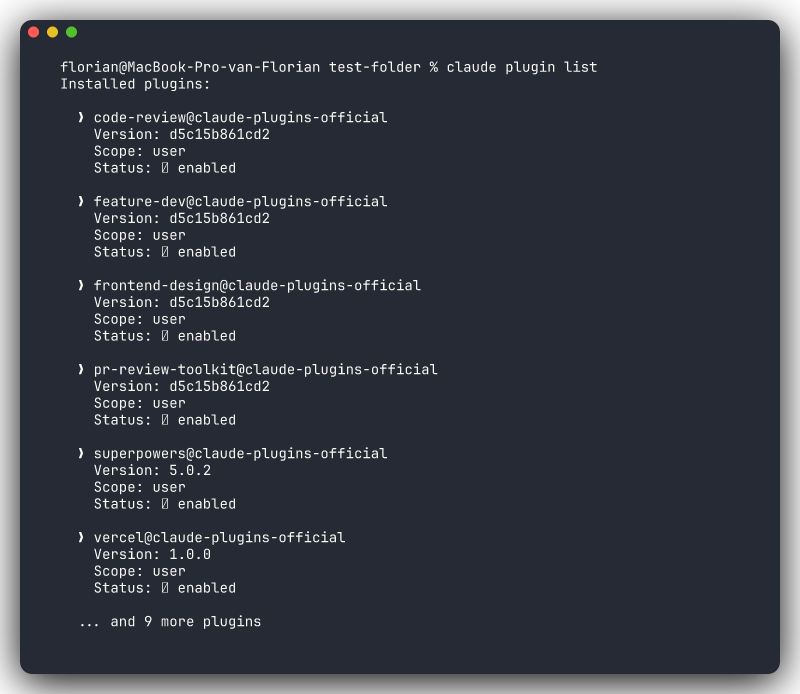
Plugins bundle skills, hooks, MCP servers, and configuration into installable packages. Think of them as "batteries-included toolkits" for specific workflows.
For installation commands, marketplace browsing, and plugin management, see the official plugins documentation.
Review Before Installing
Plugins can install hooks (which run shell commands) and MCP servers (which access external services). Before installing a plugin, review what it includes. Stick to plugins from trusted sources: official tool providers, well-known community maintainers, or plugins your organization has vetted.
Decision Flowchart
When you need to customize Claude Code's behavior, use this decision tree:
Need project context that Claude should always know?
  → CLAUDE.md

Need different rules for different parts of the codebase?
  → .claude/rules/ with paths: frontmatter

Need automatic enforcement that never gets forgotten?
  → Hooks (PostToolUse, PreToolUse, Stop)

Need a repeatable prompt workflow?
  → Skill in .claude/skills/ (project or personal)

Need a pre-built workflow from the community?
  → Plugin from the marketplace

Need to connect to an external service or API?
  → MCP Server

Need to share a complete toolchain as one package?
  → Plugin
Start Simple
Most projects only need CLAUDE.md and maybe a few skills. Add hooks when you find Claude keeps forgetting to format or lint. Add MCP servers when you're tired of switching to a browser for issue tracking or database queries. Add plugins when you want pre-built workflows or need to share your setup across repos or teams.
Don't configure all six layers on day one. Let the need drive the tooling.
Combining Layers
The layers work best in combination. A well-configured project might look like this:
CLAUDE.md: project overview, build commands, architecture, conventions
.claude/rules/api.md: REST API patterns scoped to src/api/**
.claude/rules/components.md: React component rules scoped to src/ui/**
.claude/settings.json: hooks for auto-formatting, MCP server config
.claude/skills/fix-issue/SKILL.md: look up issue, implement, test, commit
.claude/skills/review/SKILL.md: review current diff for bugs and style
MCP: GitHub: PR creation, issue lookup without leaving the terminal
Plugin: superpowers: brainstorming, TDD, debugging, and verification workflows
Each layer handles its own concern. CLAUDE.md provides context, rules provide scoped conventions, hooks enforce formatting, skills encode workflows, MCP connects to external services, and plugins provide pre-built toolchains. No single layer tries to do everything.