
Module 6: Workflows, Git Safety & Testing
Claude Code is powerful but not infallible. It generates plausible code that compiles, passes type checks, and looks right, but "looks right" isn't the same as "is right." This module covers the workflows that keep you safe when letting an AI agent modify your codebase.
The Verify Loop
The single most valuable workflow in Claude Code is deceptively simple:
Write code → Run tests → Read failures → Fix → Run tests again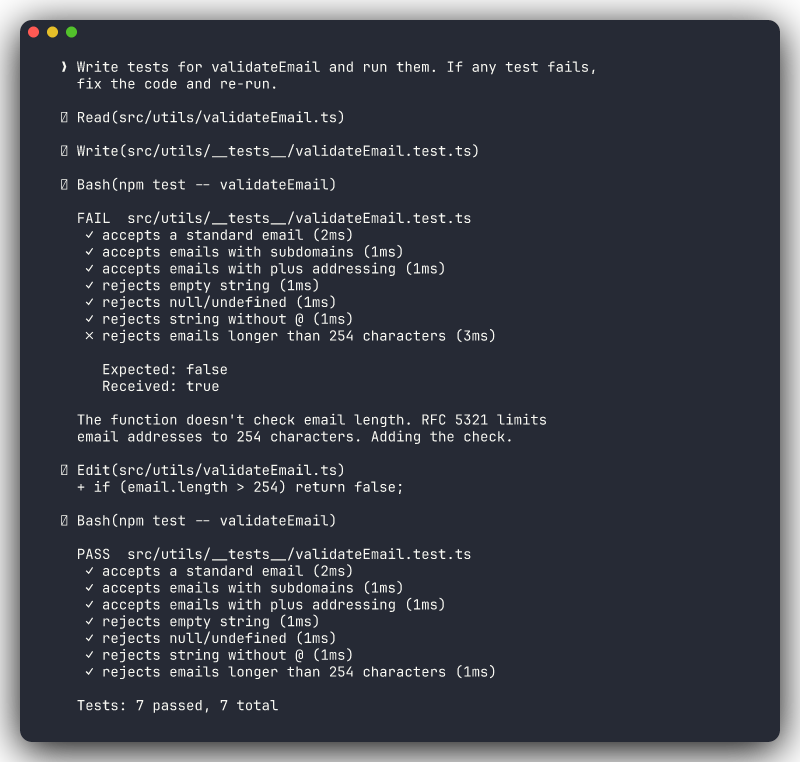
This isn't "run and hope." Claude Code reads stack traces, understands assertion errors, interprets compiler output, and adapts its approach. It will often fix a test failure differently than it caused it, finding the actual root cause rather than papering over the symptom.
The key to making this work: tell Claude Code how to run your tests. Include test commands in your CLAUDE.md so it doesn't have to guess.
## Commands

```bash
npm test             # Jest, full suite
npm run test:watch   # Jest in watch mode (single file)
npm run lint         # ESLint + Prettier check
```
When Claude Code knows the test command, it can close the loop autonomously. Without it, it writes code and stops, and you lose the most valuable part of the agentic workflow.
Test-Driven Prompts
These prompts activate the verify loop naturally:
- "Write tests for the login function and run them" forces Claude to both write and validate
- "Run the test suite and fix any failing tests" is a pure fix-iterate cycle
- "Add edge case tests for email validation: empty strings, missing @, unicode characters, strings over 254 chars" is specific enough to produce meaningful coverage
- "This function has a bug where it returns null for empty arrays. Write a failing test first, then fix the function" gives you TDD style, test-then-fix
Why "and run them" matters
Compare these two prompts:
- "Write tests for the payment service" Claude writes tests and stops. You don't know if they pass.
- "Write tests for the payment service and run them" Claude writes tests, runs them, sees failures, fixes its own mistakes, runs again. You get working, validated tests.
Those three words ("and run them") are the difference between generated code and verified code.
Git Checkpoint Workflow
Git is your safety net. Not "nice to have," but essential. The workflow is simple and should become muscle memory.
Before Claude Makes Changes
Check your working state and create a checkpoint:
git status
git add -A && git commit -m "checkpoint: before Claude changes"
Now you have a known-good state to return to. If Claude's changes are perfect, great. The checkpoint commit is harmless. If things go sideways, you have an instant escape route.
After Claude Makes Changes
Review what changed, then commit intentionally:
git diff                    # See what Claude changed
git diff --stat             # Quick overview: which files, how many lines
git add -A && git commit -m "feat: add email validation with unicode support"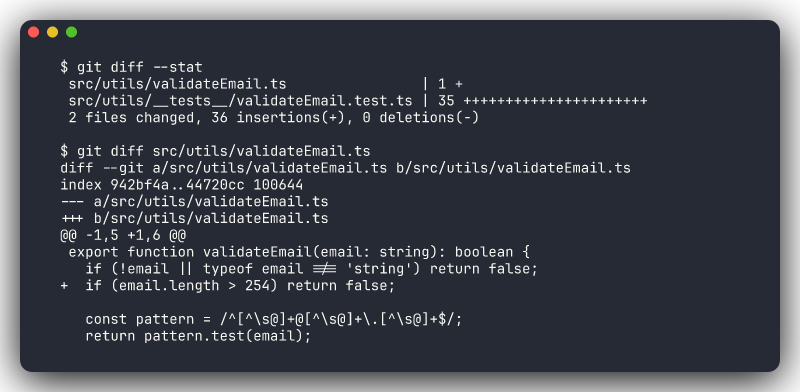
When Things Go Wrong
You have options depending on how far things have gone:
# Undo uncommitted changes (haven't committed Claude's work yet)
git checkout .

# Undo the last commit but keep the changes as uncommitted
git reset --soft HEAD~1

# Undo the last commit entirely — changes are gone
git reset --hard HEAD~1
Or skip the git commands entirely and ask Claude:
- "Undo your last changes"
- "Revert the changes you made to auth.ts"
- "That approach didn't work. Go back to what we had before and try X instead"
Don't confuse "undo" strategies
git checkout . discards uncommitted changes, which is safe if you haven't committed yet. git reset --hard HEAD~1 destroys the last commit. Use this when you committed Claude's work and then realized it's wrong. Know which situation you're in before running either command.
/rewind — Navigate Checkpoints
The /rewind command lets you step back through your conversation to a previous checkpoint. Think of it as undo for your Claude Code session: it rolls back to a known-good state in the conversation, so you can try a different approach without starting completely over.
This is especially useful when Claude went down a wrong path mid-task. Instead of /clear (which loses everything) or continuing (which carries forward the bad context), /rewind lets you go back to the decision point and redirect.
Ctrl+G — Edit Before Executing
When Claude proposes a plan or a sequence of actions, press Ctrl+G to edit the plan before it executes. This gives you a chance to narrow scope, adjust the approach, or remove steps you don't want — without rejecting the entire plan and re-prompting from scratch.
The Rhythm
For any non-trivial task, the rhythm looks like this:
- Checkpoint commit
- Give Claude a task
- Review the diff
- Commit (or revert)
- Next task
This keeps each change isolated and reversible. If step 3 reveals scope creep or a bad approach, you revert and re-prompt. No untangling needed.
Review Diffs Before Accepting
This is the golden rule of AI-assisted development: read the diff before you commit.
What to Check
- Only intended files are modified. If you asked Claude to fix a bug in
auth.ts, and it also modifiedconfig.ts,utils.ts, andpackage.json, ask why before accepting - The logic is actually correct. AI code can look syntactically perfect while having subtle logic errors. Read it like you'd read a PR from a colleague
- Error handling is preserved. Claude sometimes simplifies code by removing try/catch blocks, null checks, or edge case handling. If the original code handled errors, the new code should too
- No hardcoded values appeared: API URLs, credentials, magic numbers, debug flags
- The scope matches your request. Did you get what you asked for, or something adjacent?
The PR Standard
The Rule of Thumb
If you wouldn't approve it in a pull request from a colleague, don't accept it from Claude.
This means:
- Read the full diff, not just the summary
- Question changes you don't understand
- Push back on unnecessary modifications
- Ask for explanations: "Why did you change the error handling in the catch block?"
- Request reverts: "Revert the changes to utils.ts — I only asked you to modify the controller"
Claude Code responds well to specific pushback. It won't argue. It'll explain its reasoning or undo the change.
Common Pitfalls
Blind Trust
AI-generated code has a specific failure mode: it looks more correct than it is. The syntax is clean, the variable names are sensible, the structure follows patterns. This surface-level quality can trick you into skimming rather than reading.
Common blind-trust failures:
- Logic bugs: the code handles the happy path but fails on edge cases the AI didn't consider
- Security gaps: missing input validation, SQL injection vectors, improper auth checks
- Convention mismatches: correct code that doesn't follow your team's patterns, making the codebase inconsistent
- Dependency assumptions: using a library method that doesn't exist in your installed version
The fix is verification, not distrust. Run the tests. Read the diff. Check edge cases.
Scope Creep
You asked Claude to fix a null pointer exception. It fixed the bug, refactored the surrounding method into three smaller methods, renamed two variables for "clarity," updated the imports, and added JSDoc comments to the file.
Each individual change might be fine. Together, they make the diff unreadable and the review impossible.
Prevention strategies:
- Be specific: "Fix the null check on line 42 of auth.ts. Don't modify anything else."
- Use "ONLY" as a boundary marker: "ONLY modify the
validateTokenfunction" - Scope with plan mode: "Plan how you'd fix this bug. Don't make changes yet." Then review the plan, and approve or narrow it
- Reject and re-prompt: "Revert everything except the null check fix. I'll handle the refactoring separately."
Long Sessions Without Checkpoints
After 45 minutes of back-and-forth, Claude has made changes across 12 files. Something isn't working, and you're not sure when it broke. You have no commits since you started.
This is the worst position to be in. You can't revert cleanly. You can't diff against a known-good state. Your options are "keep debugging" or "lose everything."
The fix: commit after every successful change, not at the end of the session. Small, frequent commits are free. Lost work is expensive.
Session Decay
Long Claude Code sessions have a second problem: context decay. After many turns, Claude's memory of early decisions fades. It might contradict its own earlier approach or forget constraints you set. For complex tasks, prefer shorter sessions with clear checkpoints over marathon sessions.
Production Checklist
Before merging any AI-assisted changes, walk through this checklist:
- [ ] All tests pass: run the full suite, not just the tests Claude wrote
- [ ]
git diffreviewed: no unintended file changes, no scope creep - [ ] No hardcoded secrets or credentials: API keys, passwords, tokens, connection strings
- [ ] No removed error handling: try/catch blocks, null checks, validation logic, fallbacks
- [ ] Changes match the original request: you got what you asked for, not more
- [ ] Edge cases considered: empty inputs, null values, concurrent access, network failures
- [ ] Manual smoke test: for UI or API changes, run the app and verify the behavior
Automate What You Can
The first four items on this checklist can be partially automated with hooks. Auto-run tests after changes, auto-lint for credential patterns, auto-format to catch style drift. The more you automate, the less you need to manually verify on every change.
Putting It Together
The safe workflow for any non-trivial Claude Code task:
1. git commit -m "checkpoint: before task X"
2. Prompt Claude with a specific, scoped task
3. Let the verify loop run (write → test → fix → test)
4. Review git diff
5. Walk through the production checklist
6. git commit -m "feat/fix: description of what changed"
7. Next task
This is the workflow that lets you move fast with confidence. The developers who skip steps 1, 4, and 5 are the ones who spend afternoons debugging AI-introduced regressions.