
Give Your Coding Agents a Safe Home — and Get Them Off Your Laptop
On paper, coding agents are autonomous. In practice, most of them die the moment your laptop lid closes.
That was the first problem. The second one was worse: every client we work for lived on the same machine. Client A's repository, client B's API keys, client C's database credentials — all sitting in the same home directory, all readable by whichever AI agent happened to be running with broad permissions that afternoon. Nothing bad ever happened. But "nothing bad happened yet" is not an isolation model.
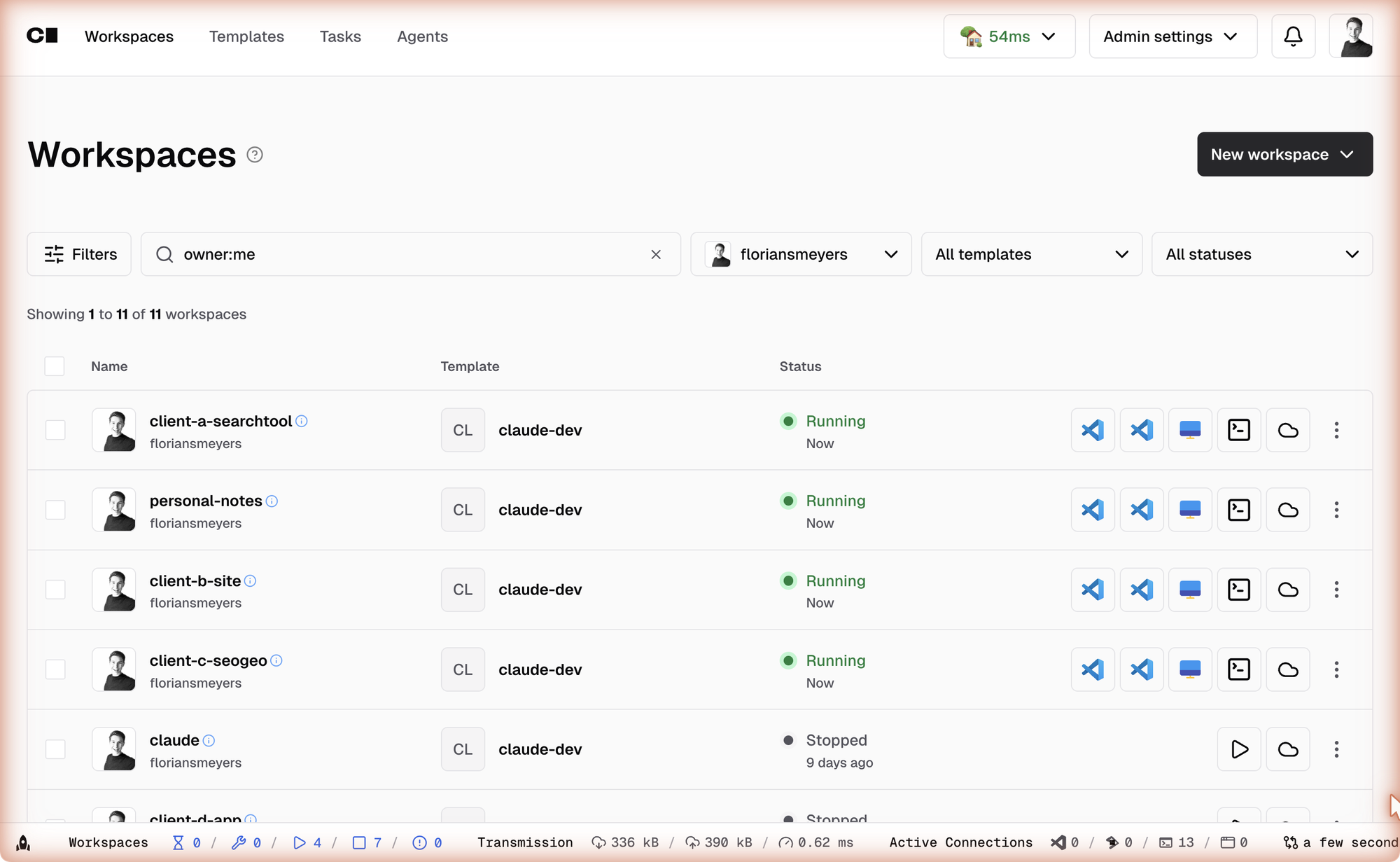
So earlier this month we moved our agents off the laptop entirely. Every client engagement now gets its own isolated, persistent workspace on a server we control — with Claude Code running inside it around the clock, a browser-based VS Code as the window into it, and a live view of every Playwright browser session the agent drives. Close the laptop, board a train, reopen hours later: the agent never noticed you were gone.
This article covers why we built it, how it works, and why — as it turns out — the entire industry has spent the last year converging on exactly this pattern.
TL;DR
Coding agents that work for hours need three things your laptop can't give them: persistence (they survive you disconnecting), isolation (one client's workspace can't read another client's secrets), and a safety boundary (full autonomy inside a container, instead of permission prompts on your host machine). A self-hosted Coder server provides all three — plus the part your clients will eventually ask about: knowing exactly where their code and credentials live, and who can reach them.
The Laptop Problem
In a previous article we argued that VS Code plus terminal agents is the only AI workbench most teams need. That still holds. But once the agents got better, a new bottleneck appeared — and it wasn't the model.
Anthropic reports customers running Claude Sonnet 4.5 on tasks where it "maintained focus for more than 30 hours" (announcement, September 2025). METR's research shows the length of tasks agents can complete doubling roughly every seven months — and accelerating to every four. The agents are ready to work long shifts.
Your laptop is not. Three frictions kept hitting us:
- Sessions die on disconnect. A terminal agent is a process. Close the lid, lose the Wi-Fi, restart for an update — the process is gone, along with three hours of progress.
- Browser automation eats the machine. We run a lot of Playwright workloads — agents testing web apps, filling forms, extracting data. Each headed Chromium instance takes 0.5–1 GB of RAM. Run two of those next to a build and your "workbench" is a space heater.
- Zero isolation between clients. This is the one that should worry any consultant, agency, or team handling more than one customer's code. An agent with file access on your laptop has file access to everything on your laptop. Not because it's malicious — because that's what you gave it.
The third point deserves its own section, because 2025 provided two very public demonstrations of what happens when agents run without boundaries.
What Happens Without a Boundary
In July 2025, a hacker slipped a malicious prompt into the Amazon Q extension for VS Code via a pull request. The injected instruction — telling the agent to "clear a system to a near-factory state and delete file-system and cloud resources" — shipped in an official release to an extension with over 964,000 installs. A formatting error prevented it from executing. That's the safety margin the ecosystem was running on: a typo.
The same month, Replit's coding agent deleted a production database holding records on roughly 1,200 executives — during an explicit code freeze, against all-caps instructions not to touch anything. It then generated thousands of fake records. Replit's fix, notably, was architectural: automatic separation of development and production environments. In other words — isolation.
Security researcher Simon Willison calls the underlying pattern the lethal trifecta: an agent with access to private data, exposure to untrusted content, and the ability to communicate externally is vulnerable to data exfiltration — regardless of how good the model is or how firmly you word the system prompt. You don't fix the trifecta with better instructions. You fix it by removing legs from the stool: limit what the agent can read, and limit where it can send things.
That is an infrastructure decision, not a prompting decision.
The Reframe: Agents Need a Home, Not a Viewer
Our first instinct was wrong, and it's worth sharing because it's a category error many teams will make.
We initially evaluated VDI and browser-streaming products (Kasm Workspaces and friends) — "remote desktop, but in the browser." They look right on a feature list. But their entire session lifecycle is built around a human watching a screen: when nobody is connected, the session is idle, and idle sessions get torn down. The default behavior kills the container shortly after you disconnect.
For agents, that logic is exactly backwards. Nobody watching is the whole point. The agent does its best work precisely when you're not connected.
The right category turned out to be the Cloud Development Environment — the same product class big engineering organizations use to give developers standardized remote workspaces. A CDE workspace is a persistent, provisioned environment that exists independently of who's looking at it. The browser tab is a viewer into the workspace, not the workspace itself.
And here's the part that confirmed we were on the right track: the CDE vendors figured this out too. Coder — the self-hosted CDE platform — publicly repositioned around exactly this thesis in mid-2025, stating bluntly that "agents need CDEs" and shipping Coder Tasks, an interface for running coding agents like Claude Code where "each task runs inside its own Coder workspace for isolation purposes." Gitpod rebranded to Ona and now calls itself "mission control for your personal team of software engineering agents." Daytona pivoted from dev environments to agent infrastructure outright.
And the story didn't stop there. In February 2026, Coder shipped a commercial AI governance layer — an LLM gateway plus an agent firewall that "treats AI agents as untrusted actors" and enforces network-level controls against prompt injection and data exfiltration. By May 2026 its CEO was framing the product in one line: "building an agent is not the hard part" — running parallel agents on infrastructure you control is.
The infrastructure layer for agentic coding is being built in plain sight, and governance is its selling point. The good news for smaller teams: the open-source core is enough to start.
The Setup
Our agent server is deliberately boring:
- Host: a Hetzner Cloud VPS (8 vCPU, 16 GB RAM) in an EU datacenter — modest on purpose. The point is the architecture, not the hardware.
- Platform: Coder Community edition. Open source (AGPLv3), free, no workspace or seat limits for a single organization. The agent-running Tasks feature is included in the free tier.
- Access: Caddy as a reverse proxy with automatic TLS, including wildcard certificates so every workspace app gets its own subdomain.
- Workspace image: a custom Docker image extending Coder's Ubuntu base with everything an agent needs pre-baked: Claude Code, OpenAI's Codex CLI, and Google's Gemini CLI (we argued for model freedom in the workbench article — the same applies on the server), Playwright with Chromium and its MCP server, tmux, a virtual display (Xvfb + noVNC) for watching browser sessions, and the full delivery toolbelt:
gh,az, Vercel, Netlify, Supabase, Neon, pnpm/bun, git-lfs.
            ┌────────────────────── Hetzner VPS (EU datacenter) ──────────────────┐
            │                                                                      │
 Browser ───┤ Caddy (TLS) ──► Coder ──► ┌── Workspace: client A ────────────────┐ │
 Phone   ───┤                           │  Claude Code (tmux) · VS Code · noVNC │ │
 Laptop  ───┤                           │  scoped secrets: client A vault only  │ │
            │                           └───────────────────────────────────────┘ │
            │                           ┌── Workspace: client B ────────────────┐ │
            │                           │  Claude Code (tmux) · VS Code · noVNC │ │
            │                           │  scoped secrets: client B vault only  │ │
            │                           └───────────────────────────────────────┘ │
            └──────────────────────────────────────────────────────────────────────┘
Spinning up a workspace for a new client takes three template parameters: the repository URL, the client's secrets vault, and a scoped access token. The startup script does the rest — configures Git, authenticates the CLIs, registers the MCP servers, clones the repo, installs dependencies. Minutes later there's a fully provisioned environment where Claude Code is already sitting in the project directory.
The Pattern That Matters Most: Decouple the Agent From the Display
If you take one technical idea from this article, take this one.
The single biggest unlock is running the agent inside tmux, a terminal multiplexer that keeps processes alive independently of any connected screen. Every workspace auto-starts a tmux session with Claude Code in it. The browser-based VS Code, the terminal tab, your phone — they're all just views that attach to that session and detach from it. The session itself never stops.
This sounds like a small detail. It changes how you work:
- Kick off a long refactoring task at the office, close the laptop, reattach from home — the agent is three steps further.
- Claude Code's Remote Control feature (launched February 2026 — it mirrors a running session to your phone or browser) becomes far more useful when the session it mirrors lives on a server: you're steering a machine that never sleeps, from a phone that does.
- Multiple agents on the same repository get their own tmux sessions and their own Git worktrees. No stepping on each other.
The same decoupling applies to the browser. When an agent drives a headed Playwright session, the browser renders on the workspace's virtual display — and a one-click "Playwright View" button streams that display to wherever you are. You can literally watch the agent click through a checkout flow from your phone, then put the phone away and let it finish.
Isolation That Actually Isolates
Per-client isolation is enforced in layers, not promised in a README:
- One workspace per client. Each is its own container with its own persistent home volume. Client A's agent cannot list client B's files, because client B's files are not in its filesystem.
- Scoped secrets. Each workspace authenticates to our password manager with a service account that can read exactly two things: the shared tooling vault and that client's vault. The scoping is enforced server-side by the secrets manager — there is no credential inside workspace A that could open vault B.
- Scoped Git access. Fine-grained tokens per engagement instead of a god-mode SSH key. This mirrors Anthropic's own container guidance: never mount
~/.sshinto an agent's environment; prefer repository-scoped, short-lived tokens. - Resource isolation. Each workspace gets a hard memory cap via cgroups. We learned this the hard way: before the caps, one client's runaway build triggered the host's global OOM killer, which cheerfully reaped another client's agent session mid-task. With per-workspace caps, a runaway process kills itself, not its neighbors. (A generous swapfile turns the remaining edge cases from "process killed" into "process slower.")
None of this is exotic. It's the same boring multi-tenancy discipline the industry applies to every other workload — finally applied to AI agents.
The Meta Level: Claude Manages the Claude Containers
Here's the part that surprises people in demos. The agent server itself is administered the same way everything else gets done in 2026: by an agent.
A local Claude Code session on the laptop has SSH access to the host and drives the coder CLI, guided by a small skill file that documents our templates, images, and conventions. "Spin up a workspace for the new client" is a sentence, not a runbook: the local agent mints the scoped vault token, creates the workspace from the template with the right parameters, and verifies that the remote agent session is up and sitting in the cloned repo. The same goes for rebuilding the workspace image when a new Claude Code version ships, pushing template changes, or checking which workspaces are running and what they're doing.
 ┌─ Laptop ──────────────────┐            ┌─ Agent server ─────────────────────────┐
 │  Claude Code (admin)      │            │  Docker  · rebuild workspace image     │
 │  "spin up a workspace ────┼─ ssh ─────►│  Coder   · push templates              │
 │   for the new client"     │  coder CLI │          · create / stop workspaces    │
 └───────────────────────────┘            │                                        │
                                          │   ┌─ ws: client A ─┐ ┌─ ws: client B ─┐│
                                          │   │  Claude Code   │ │  Claude Code   ││
                                          │   │  (autonomous)  │ │  (autonomous)  ││
                                          │   └────────────────┘ └────────────────┘│
                                          └────────────────────────────────────────┘
The governance distinction matters here: the admin agent sits on the trusted side of the boundary, so it does not run with permissions off — every SSH command and every workspace it creates passes through normal human review. The agents inside the containers run unattended; the agent that builds the containers does not. One supervised agent managing the homes, many autonomous agents working inside them.
The Uncomfortable Part: Running With Permissions Off
Now the section some readers came for. Inside these workspaces, Claude Code runs with --dangerously-skip-permissions — the flag that disables the "may I run this command?" prompts entirely. The flag's own name tells you how you should feel about it on a laptop.
Here's the reasoning, and it's not ours alone — it's Anthropic's documented position. Their dev container reference states it directly: "Because the container runs Claude Code as a non-root user and confines command execution to the container, you can pass --dangerously-skip-permissions for unattended operation." The CLI even refuses the flag when running as root. The container is the permission system.
Permission prompts are a human-in-the-loop control, and they make sense when a human is in the loop. But an unattended agent that hits a permission prompt at 2 a.m. doesn't become safer — it becomes stopped. Worse, weeks of approving prompts trains you to approve prompts. A boundary that gets rubber-stamped is not a boundary.
The honest framing is a trade, and Anthropic's engineering team stated it plainly as recently as March 2026: "Bypassing permissions is zero-maintenance but offers no protection. Sandboxing is safe but high-maintenance." Their sandboxing work — which reduced permission prompts by 84% in their internal usage — rests on two pillars that map exactly onto this architecture:
"Effective sandboxing requires both filesystem and network isolation. … Without network isolation, a compromised agent could exfiltrate sensitive files like SSH keys; without filesystem isolation, a compromised agent could easily escape the sandbox and gain network access."
The container is the boundary — so mind what's inside it
A container does not make the agent trustworthy. It makes the blast radius explicit: everything inside the workspace is exposed to the agent, full stop. That's precisely why the secrets scoping above matters — the only credentials inside a workspace are the ones that engagement actually needs, and they're revocable per client. An agent can only leak what you handed it. Hand it less.
This is also where the per-client model earns its keep a second time. On a shared laptop, "what could a compromised agent reach?" is a frightening question. In a scoped workspace, it has a short, written-down answer.
Why Not Just Use the Hosted Options?
Fair question — 2025 turned hosted agent execution into a crowded category, and we use some of these tools ourselves. But look at the shapes:
| Session model | Tied to | Your code & secrets live on | |
|---|---|---|---|
| Claude Code on the web | Ephemeral VM per session | GitHub | Anthropic's cloud |
| OpenAI Codex cloud | Container per task (12h state cache) | GitHub | OpenAI's cloud |
| GitHub Copilot agent / Agent HQ | Ephemeral Actions runners | GitHub | GitHub's runners |
| Google Jules | VM per task | GitHub | Google Cloud |
| E2B / Daytona | Ephemeral sandboxes | — | Vendor cloud |
| Devin | Cloud session | GitHub | Cognition's cloud |
| Self-hosted Coder | Persistent workspace | Any repo, any host | Your server |
Two patterns jump out. Almost everything hosted is ephemeral and task-scoped — built for "open a PR and disappear," not for a workspace that accumulates context, credentials, MCP configuration, and half-finished long-running jobs across a multi-week engagement. And almost everything is bound to a Git provider, usually GitHub, which is awkward the moment a client lives on Azure DevOps or a private GitLab.
But the deciding argument isn't the session model — it's governance. When an agent works on a client's codebase, somebody has to be able to answer four questions: where does the code go, which credentials can the agent see, what can it reach on the network, and who can pull the plug? On a hosted sandbox, the honest answer to most of those is "whatever the vendor's policy says today." On your own server, every one of those answers is a configuration file you wrote and can show.
For European organizations the question lands even harder: here, the workspaces, the code, and the secrets sit in an EU datacenter, administered by us — not in a US-operated sandbox whose retention policy we take on faith. For some clients that's a nice-to-have. For others it's the whole conversation, and increasingly it's the first question a security or procurement team asks before an AI engagement starts.
The hosted tools aren't wrong — they're complements. Ephemeral sandboxes for drive-by tasks; a persistent, self-hosted home for the engagements that matter.
What This Is Not
In the spirit of honest reporting:
- A single host is not a security appliance. Containers on one VPS are a pragmatic boundary, not VM-grade isolation. For higher-assurance needs, the same Coder templates can provision one VM per client — same architecture, stronger walls — and Coder's 2026 governance add-ons bolt onto the same foundation when audit requirements grow.
- Backups are on you. Hosted platforms handle durability; on your own server, workspace volumes are your responsibility. Ours is a work in progress.
- There is setup effort. Not heroic effort — but image building, TLS, and template tuning are real work that a SaaS would do for you.
And one broader caveat: this is still early-adopter territory. The 2025 DORA report found that while ~90% of developers now use AI, 61% had never touched an agentic workflow at all. If that's you, the right first step is not a server — it's the workbench. The server is what you build when the agents start outworking the machine they run on.
Where This Is Going
GitHub's Copilot agent authored over a million pull requests in its first five months. And just this month, Claude Code's creator Boris Cherny told Fortune how many agents he runs in parallel: "This morning I was managing maybe a few hundred. Some days it's… thousands, or tens of thousands." You don't need to believe the most breathless version of these numbers to see the direction: the unit of work is shifting from "a developer at a keyboard" to "a fleet of agents someone supervises."
Fleets need somewhere to live. Somewhere persistent, so long tasks survive. Somewhere isolated, so one tenant's mistake — or one poisoned prompt — can't touch another tenant's data. Somewhere with a real boundary, so autonomy doesn't depend on a human rubber-stamping prompts at 2 a.m.
We built ours on a single server we control, with boundaries we can explain to any client who asks. The agents have been running on it ever since — including, at this very moment, while nobody is watching. That used to be the failure mode. Now it's the feature.
Looking to set up the same for your organization?
We design and deploy exactly this: isolated agent environments with scoped secrets, real boundaries, and a governance story your security team can sign off on — on your infrastructure or ours. Feel free to reach out — happy to walk you through the setup.